Retro Pixel Car Racing Challenge
About the Game
Description
Game Introduction
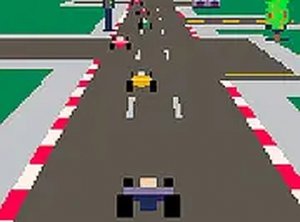
Crazy Position is a retro pixel racing game that puts you in the driver's seat with a unique twist. You begin each race from the very last position, and your goal is to overtake as many rival cars as possible to improve your standing. The game features classic pixel art that recalls old-school arcade racers, creating a nostalgic feel. Not all opponents are equal: red and yellow cars are especially dangerous because they weave unpredictably, making them harder to pass. With simple controls and fast-paced action, Crazy Position offers an exciting test of your racing skills. Available free online, it runs directly in your browser and supports full screen mode for an immersive experience.
How to Play
Playing Crazy Position is easy and intuitive. Use your keyboard to control your car: press the arrow keys to steer left or right and accelerate forward. The main objective is to start from last place and overtake as many cars as possible while avoiding collisions. Be extra cautious around red and yellow cars, as they drive recklessly and can cause crashes. The game requires quick reflexes and smart timing to navigate through traffic. As you progress, balance speed with caution to stay in the race. The game is designed for desktop play, so a keyboard or mouse works best. You can switch to full screen mode for a better view of the track.
Game Features
Retro pixel graphics create a nostalgic arcade feel. Challenging AI opponents with unique driving patterns. Free browser play with no download required. Full screen support for an immersive view. Simple keyboard controls for easy pickup.
Tips for Success
Focus on learning the behavior of different opponent cars, especially the unpredictable red and yellow ones. Practice maintaining a steady speed to avoid crashes while overtaking. Use the full screen mode to improve visibility and reaction time. Stay patient and avoid risky maneuvers—consistent progress is better than aggressive driving. Regular practice will help you master the traffic patterns and improve your final position.
🛠️ Compatibility
• OS: Windows 10+, macOS 11+, iOS 14+, Android 10+ • Browsers: Chrome 100+, Safari 15+, Edge 100+, Firefox 100+ • Not compatible with Internet Explorer Tested on real devices – works as expected